Posts

Radius of a Projected Sphere

Image
It's useful to calculate sphere projection in clip space. One usage is to determine LOD of a model. As you might have known, sphere projection results in ellipse instead of sphere. In this post, a way to approximate radius of projected sphere is given. Assume the sphere is in the center of the screen and we know the \(FOV\) of the camera, sphere radius \(r\) and distance from camera \(z\). Looking at the diagram below: The approximate projection of sphere radius in clip space is given by: $$ approx\_projected\_radius = \frac{y}{y_{max}} = \frac{r}{z \times \tan (\frac{FOV}{2})} $$

GDC 2016 Links

Here are my growing links to GDC 2016 slides/presentations: Programming Advanced VR Rendering Performance  - Alex Vlachos An Excursion in Temporal Supersampling - Marco Salvi An Introduction to SPIR-V  - Neil Henning Building a Better Jump - J. Kyle Pittman Developing the Northlight Engine: Lessons Learned  - Ville Timonen Enlighten feature sets for large world games  - Geomerics Fast, Flexible, Physically-Based Volumetric Light Scattering – Nathan Hoobler Fixed Point Iteration  - Huw Bowles The runtime asset format forGL-based applications - Patrick Cozzi, Tony Parisi Improving Geometry Culling for ‘Deus Ex: Mankind Divided – Nicolas Trudel More Explosions, More Chaos, and Definitely More Blowing Stuff Up: Optimizations and New DirectX Features in Just Cause 3 - Antoine Cohade & Emil Persson Object Space Lighting  - Dan Baker Optimizing the Graphics Pipeline with Compute  - Graham Wihlidal Real-Time BC6H Compression on GPU ...

DirectX 12 FAQ

Image
Windows 10 is here! I wanted to document all issues that I encounter when trying to develop with DirectX12. Q: What do I need to try out DirectX 12? A: Windows 10, Windows 10 SDK (DirectX 12 is part of SDK), Graphics Driver that supports WDDM 2.0. Q: Where do I download DirectX 12 SDK? A: DirectX 12 SDK is part of Windows 10 SDK, so you should download that instead ( Link ). Q: I installed Windows 10, however DirectX Diagnostic Tool doesn't show I have DirectX version 12? A: DxDiag shows the feature level supported instead of the DirectX version. You can still develop with DirectX 12 API, however, your feature level is limited to that. Q: I installed Windows 10, DirectX 12 and latest graphics driver, however, when running the graphics samples, it crashed in D3D12CreateDevice A: Note that DirectX 12 requires graphics driver that support WDDM 2.0. At this time of writing (Aug 9, 2015), not all graphics drivers support all graphics cards with WDDM 2.0. For example, Ra...

GDC 2015 Links

Here are [growing] links to GDC 2015 slides/presentations: Update: GDC Vault for GDC 2015 is now up!  Programming Track Khronos Group ( Link ) Khronos OpenCL GDC Khronos Vulkan GDC Valve Vulkan Session GDC Live Stream of Vulkan Session (Youtube) The Future of High-Performance Graphics Virtual Reality VR Direct: How NVIDIA Technology is Improving the VR Experience ( pptx ,  pdf ) - Nathan Reed, Dean Beeler Advanced VR Rendering  - Alex Vlachos Far Cry 4 Fast Iteration for Far Cry 4 - Optimizing Key Parts of Dunia Pipeline  - Remi Quenin Rendering the World of Far Cry 4  - Stephen McAuley Adaptive Virtual Texture Rendering in Far Cry 4  - Ka Chen Mesh Cutting in Farming Simulator 15 - Gino van den Bergen Advanced Visual Effects in 2D Games - Viktor Lidholt Great Management of Technical Leads - Mike Acton Code Clinic: How to Write Code the Compiler Can Actually Optimize - Mike Acton Parallelizing the Naughty Dog Engine Using ...

DirectX11 - Development INF

Welcome to the first Development INF (stands for information)! Basically for each Development INF article, I will be listing the road blocks, gotchas, tips and tricks that I found during development; in this case DirectX11. 1. DirectX11 is part of WindowsSDK For old time DirectX developers, we usually had to install DirectX SDK. However, starting Windows 8, Microsoft has included the SDK to Windows 8 SDK. Consequently, this creates compile issues as some projects are still referencing the old DirectX path. In Visual Studio, we usually use $(DXSDK_DIR)\Include and $(DXSDK_DIR)\Lib to locate the headers and lib, however, this will be no longer the case. The headers should be in $(WindowsSDK_IncludePath) and lib in $(WindowsSdkDir)\lib\x64. 2. D3DX11 library is deprecated D3DX11 Library is Deprecated, we should no longer include d3dx11.h header and no longer use D3DX11* functions. We need to find the replacement for each function. 3. DirectXMath replaces XNAMath //#in...

Lighting Theory: Radiometry and Photometry

Recent games have been heading towards Physically Based Rendering and this requires a solid understanding on lighting theory more than ever before. This time, I'm posting my note on Radiometry and Photometry . Radiometry Radiometry  is basically ideas + mathematical tools to describe light propagation + reflection. Radiative Transfer  is a study of transfer of radiant energy (which operates on geometric optics level - macroscopic properties of light suffice to describe how light interacts with objects much larger than light's wavelength). Four Radiometric Quantities : 1.  Flux (Radiant Flux/Power) - total amount of energy passing through a surface or region of space per unit time (J/s or Watt). Total emission from light sources is generally described in terms of flux. 2.  Irradiance (E) - area density of flux arriving at a surface (Watt/m2) Radiant Exitance (M) - area density of flux leaving a surface (Watt/m2) 3. Radiant Intensity (I) - flux dens...

D3D11 Compute Shader - Part 2

Image
To understand the concept of Compute Shader, let's start from basic. Compute Shader (CS) Threads A thread is basic CS processing element. 1. CPU kicks off CS thread groups. // Total number of thread groups = nX * nY * nZ pDevice->Dispatch( nX, nY, nZ ); 2. Each CS declares the number of threads on the "thread group". // Total number of threads per thread group = X * Y * Z [numthreads(X,Y,Z)] void cs_main(...) { ... } Example // CPU pDevice->Dispatch( 3, 2, 1 ); // CS [numthreads(4, 4, 1)] void cs_main(...) { ... } // # of thread groups = 3*2*1 = 6 // # of threads per group = 4*4*1 = 16 // # of total threads = 6 * 16 = 96 N.B: Picture taken from GDC09 Slide "Shader Model 5.0 and Compute Shader" CS Parameter Input void cs_main(uint3 groupID : SV_GroupID, uint3 groupThreadID : SV_GroupThreadID, uint3 dispatchThreadID : SV_DispatchThreadID, uint groupIndex : SV_GroupIndex) { ...

Computing Bent Cone

In rendering world, there are several article that discusses about bent cone. For example Bent Normals and Cones in Screen Space and also in GPU Pro 3: Screen-Space Bent Cones: A Practical Approach . In this post, I wanted to share how I compute bent cone (bent normal and max cone angle). The paper Bent Normals and Cones in Screen Space actually discusses how you compute bent normal and max cone angle (although it's a bit math-y). Here, I want to present how I compute it. Computing bent normal is quite easy, basically you just shoot rays from your sampling point (pixel/vertex) and average the unoccluded rays (and normalize it). For max angle, it turns out we can correlate it with AO: Let: A = Half Opening of Cone Angle AO = Ambient Occlusion Value AO = UnoccludedArea / TotalArea Where: TotalArea = Hemisphere Area = 2 * pi * r * r UnoccludedArea = Area covered by Solid Angle 2A = Solid Angle 2A * r * r = 2 * pi * (1 - cos...

Translucent Shadows Part I - Starcraft II

Shadows is an important visual cue for rendering and has been incorporated into recent games via shadow mapping technique. Most shadow mapping technique only concerns about opaque object shadows and there is not a lot of about translucent object shadows. Translucent Shadows in Starcraft II Review In Starcraft II - Effects & Techniques , Dominic Fillion mentions how they render translucent shadows in Starcraft II. Here's how the rendering works: Notes: * Requires second shadow map and color buffer. Let's name them as translucent shadow map and translucent shadow buffer. Shadow Maps Rendering * Opaque Shadow Map: render opaque objects to opaque shadow map * Translucent Shadow Map: render translucent objects to translucent shadow map (z-write on, z-test on with less equal, no alpha test, records depth of closest transparency) * Translucent Shadow Buffer: Clear to white, sort translucent objects front-to-back, use Opaque Shadow Map as z-buffer, no z-write off, z-...

C/C++ Programming Tips and Tricks

Every once in a while I found some C/C++ tips and tricks. This page is going to be the repository of those tips and tricks. Constexpr Constexpr specifier declares that it is possible to evaluate the expression at compile time: 1. Constexpr function 2. Constexpr constructor 3. Constexpr variable Initialization of constexpr MUST happen at compile time (const variable can defer at runtime). Constexpr implies const and const implies static. If constexpr variable is in the header, every translation unit will get its own copy. Since C++17, inline keyword can be added to variables (and constexpr variables) that means there should only be one single copy in all translation units (this also allows to declare non-const variable in header file). Fast insertion to std::map/std::unordered_map std::unordered_map > m; auto [iter, succeed] = m.emplace( key, nullptr ); if ( succeed ) iter->second = std::make_unique (); Creating C++ function similar to printf() template inline st...

D3D11 Compute Shader - Part 1

GPU has become a general purpose processor! or at least becoming more and more general. This is proved by the existence of GPGPU APIs such as DirectCompute, CUDA, OpenCL. It's time to start learning Compute Shader (CS), in this case, DirectCompute from D3D11. Past GPGPU Coders... Believe it or not GPGPU actually has existed before Compute Shaders arrived. However, you need to structure everything in terms of graphics, i.e. in order to launch GPGPU computation you have to render geometry and you basically use Pixel Shaders to do the computation. While this style of GPGPU coding can still work today, we can do much better! Compute Shaders allow us to use GPU just like we program a regular code. The first benefit is that you don't need to care about graphics pipeline and such, you just need to dispatch your Compute Shaders and that's it. In addition, Compute Shaders bypass graphics pipeline, i.e. primitive assembly, rasterization, etc2; so you have the potential to r...

Mapping Square Texture to Trapezoid / Quadrilateral

It turns out to be not a straightforward one. If you ever want to render trapezoid but mapped to square texture coordinate, i.e. (0,0) - (1,1), it won't turn out right. Turns out there's an easy way to fix this. Basically, instead of passing in float2 texture coordinates, you need to pass in the third coordinate to do projection on texture coordinates. The solution can be found here  http://stackoverflow.com/questions/15242507/perspective-correct-texturing-of-trapezoid-in-opengl-es-2-0 . Edit: It turns out, there's a more generic solution, i.e. quadrilateral interpolation: http://www.reedbeta.com/blog/2012/05/26/quadrilateral-interpolation-part-1/ Other references that might be useful: http://hacksoflife.blogspot.com/2009/11/perspective-correct-texturing-q.html http://www.xyzw.us/~cass/qcoord/ http://www.gamedev.net/topic/419296-skewedsheared-texture-mapping-in-opengl/

CPU Branch Optimization

Just want to share collection of tricks to optimize branch in CPU. Bounds Checking Checking bounds [0,max) // int i, max; // if (i >= 0 && i < max) {} if ((unsigned int) i < (unsigned int)max) {} Checking bounds[min,max] // int i, min,max; // if (i >= min && i <= max) {} if ((unsigned int)(i - min) <= (unsigned int)(max - min)) {}

Reconstructing Position From Depth

Matt posted an excellent article about reconstructing position from depth. Check out his article here: http://mynameismjp.wordpress.com/2009/03/10/reconstructing-position-from-depth/ He has the following function to reconstruct View Space Position from Post Clip Space Position : // Function for converting depth to view-space position // in deferred pixel shader pass. vTexCoord is a texture // coordinate for a full-screen quad, such that x=0 is the // left of the screen, and y=0 is the top of the screen. float3 VSPositionFromDepth(float2 vTexCoord) { // Get the depth value for this pixel float z = tex2D(DepthSampler, vTexCoord); // Get x/w and y/w from the viewport position float x = vTexCoord.x * 2 - 1; float y = (1 - vTexCoord.y) * 2 - 1; float4 vProjectedPos = float4(x, y, z, 1.0f); // Transform by the inverse projection matrix float4 vPositionVS = mul(vProjectedPos, g_matInvProjection); // Divide by w to get the view-space position ...

C# Integer to String Builder

As many of you know, StringBuilder.Append(int) method creates a garbage. This is bad for XNA games that do this conversion every frame. In this article, I provide one implementation to convert int to string without creating garbage. I tried to be as efficient as possible; if you find better way to do this, please let me know. public static class StringBuilderExtension { private static char[] charToInt = new char[] { '0', '1', '2', '3', '4', '5', '6', '7', '8', '9' }; public static void Swap(this StringBuilder sb, int startIndex, int endIndex) { // Swap the integers Debug.Assert(endIndex >= startIndex); int count = (endIndex - startIndex + 1) / 2; for (int i = 0; i

World, View and Projection Matrix Internals

Image
This convention below is applicable to Direct3D and XNA matrices World Matrix Given a  position  and basis vectors  right ,  up  and  look  of an  object , a world matrix can be formed by the following arrangement: View Matrix Given a  position  and basis vectors  right ,  up  and  look  of a viewer, a view matrix can be formed by the following arrangement: Projection Matrix Given field of view  FOV ,  aspect ratio , near clip plane  Zn  and far clip plane  Zf , a perspective projection matrix can be formed by the following arrangment:

Minimum Bounding Sphere for Frustum

Image
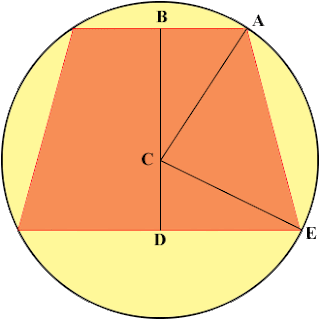
I was in need to create a minimum bounding sphere for a frustum (truncated pyramid). The easiest way is to find the "center" of this pyramid. I got it by calculating the middle point of "the center of the near plane" and "the center of the far plane". The radius will be the length between this middle point and one of the vertices of the far plane. This works however, this is not an optimal bounding sphere for frustum. I sat down and tried to figure out this problem. It turns out there is a simple way of doing this. Since the frustum is created with perspective projection in mind, this frustum is symmetrical. Furthermore, if we temporarily forget about the aspect ratio, the problem can be reduced into 2D problem: " Given an isosceles trapezoid, find the circumscribed circle ". I got the image from http://mathcentral.uregina.ca/QQ/database/QQ.09.09/h/abby1.html. The first thing to realize is that the center of the enclosing circle is the inters...

Generating Alternating 0 and 1

Once upon a time, a friend of mine gave some of us a challenge. It's not exactly the same but quite similar ;) Anyway, think of ways you can generate alternating 0 and 1. If you have an Update() loop, the first time you call update it will generate 0 and the next time will be 1, and then 0,1,0,1,.. you get the idea. I found 3 ways to do this (assuming initial value of i is 0). Math + Bit i = (i+1) & 1; // You might think of this i = (i+1) % 2. Simple Math i = 1 - i; Bits Operations i = i ^ 1; Can you come up with more ways?

Avoiding Branch in Shader

Depending on which platform and target hardware, it can be a good idea to eliminate branches in shader. Here's two techniques with samples. Lerp Lerp, a.k.a. linear interpolation, is a useful function to select between two things. If you have two vectors v1, v2 and you want to select one of them based on some condition, lerp can be used. Make sure that the result of the condition (conditionMask)  is always 0 or 1.  You can then do this: result = lerp(v1, v2, conditionMask); If your condition is 0, it will return v1. If your condition is 1, it will return v2. Min/Max Min and max is very useful in some cases. For example, let say you want to have one shader to switch between lit and not-lit. Typically, we will multiply the lighting value with color. For instance: light = CalcLighting(); color *= light; So, the condition would be, if there's no lighting return 1; otherwise return the lighting value. We can easily do this with Lerp. light = lerp(1, CalcLighting(), isLi...

Simple XML parsing with Python

There are many ways to read/parse XML with Python.  I found at least 2 methods: DOM and SAX. Document Object Model (DOM) is a cross-language API from W3C for accessing or modifying XML; whereas SAX stands for Simple API for XML. Most of the time, we don't need to understand the whole XML vocabularies; and most of the time we want to parse simple stuff like: <root> <person name="somebody"></person> <person name="otherguy"></person> </root> I think the simplest way to go is to use python minidom implementation that looks like this: from xml.dom import minidom # parse the xml theXml = minidom.parse('data.xml') # iterate through the root rootList = theXml.getElementsByTagName('root') for root in rootList: # you can get the element name by: root.localName # iterate through person personList = root.getElementsByTagName('person') for person in personList: # get the att...